Most people learning from shows and chats want the same thing: one day, to follow along without the translation. Yet the easiest way to study puts that translation right where your eyes go.
Of everything in the Vocabi suite, our favorite feature is the small one that deals with this. We call it the earned translation. The translation sits under the line, covered, and it uncovers only as you tap the words you didn't know.
You tap, and the sentence appears a piece at a time
The earned translation runs in two places: the Vocabi browser extension, on subtitles, and Yap, under messages from friends. It works the same way in both.
- The line arrives in your target language. Below it sits the real translation, in correct grammar, covered up.
- You read what you can. Words already in your deck don't need tapping.
- You tap a word you don't know. You see its meaning, and the part of the sentence it became uncovers.
- You finish the line. Once you've tapped every word you didn't know, the rest of the sentence appears.
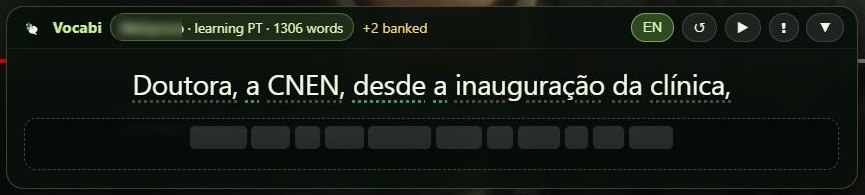
So you always see the meaning you asked for, and you never see the answer first. It came from a simple annoyance while building Vocabi: watching YouTube with the full English sitting under the Portuguese made it far too easy to stop reading the Portuguese.
Two good tools handle the translation differently
Language Reactor and Lingopie are both good at this kind of learning, and both give you ways to manage the translation. The difference is how much of it you get, and when.
Disclosure: this article comes from the people who make Vocabi, so check each product's own page too.
| Language Reactor | Lingopie | Vocabi earned translation | |
|---|---|---|---|
| Where you use it | Netflix and YouTube in desktop Chrome | Its own library, plus a Netflix extension for four languages | Netflix, YouTube and Angel in desktop Chrome; Yap chats |
| How the translation shows | Dual subtitles, with a blur you can turn on or off | Dual subtitles you can switch on or off | Covered at first, with an option to show it whole |
| How you reveal it | Hover over the blurred subtitle | Switch the track on | Tap a word to uncover its part |
| What a reveal shows | The subtitle line | The whole track | One part of the sentence, then the rest when you finish |
| Cost | Free, with a paid Pro tier | About $84 a year, or $229 once | Free; the extension is in testing |
Language Reactor's blur is the closest thing to our idea, and it's a good one. We couldn't find its official settings page, so that row relies on its community forum. Lingopie's strength is different: you can simply turn the English off and stay with the target language. That takes discipline, though, and the English is one click away when a line gets hard.
The earned translation tries a middle path. You never have to choose between no help and all of it, because the help you get is the size of what you asked.
Why it might help you reach your goal
Nobody has tested the earned translation in a study, including us. So this is a hope with reasons behind it, and two findings make us optimistic.
Your eyes go to the easy line, and that may cost you
Wang and Pellicer-Sánchez (2022) tracked the eyes of 112 intermediate to advanced Chinese learners of English as they watched a documentary. Those with both subtitle lines spent more time on the Chinese translations of new words than on the English words themselves. Attention to the English words predicted learning gains, and attention to the translations did not.
That study is also a good argument for dual subtitles. They beat captions for recognizing meanings, and beat first-language subtitles for recalling them. So the translation clearly helps. A covered line keeps that help and aims to move your first look onto the words you came to learn.
Trying first can pay off, as long as the answer comes quickly
Hays, Kornell and Bjork (2012) found that failing a test and then getting the answer right away led to better retention than simply being shown the material. Delayed feedback didn't bring that benefit, except when the final test ran in reverse. Reading a line, getting stuck and tapping looks a lot like that sequence.
That's a comparison, not proof. Those experiments were memory tasks, and nobody was watching a show.
The bigger hope is about your goal itself. If you want to follow a show without subtitles one day, you need practice at the moment of not quite understanding. The earned translation turns each line into a small version of that moment, and it's over in a tap.
Where it falls short, and how to try it
A few limits are worth knowing before you get attached:
- It's slower. Tapping pauses the video, so it won't suit a relaxed movie night. You can show the translation whole in Settings whenever you like.
- The match isn't always exact. A translation is a sentence, not a word-for-word map, so Vocabi infers which part to uncover. On a loose translation it can reveal the wrong part, though the whole sentence still appears at the end.
- Absolute beginners may find it hard. A line where you know nothing means tapping every word. Vocabi's first 100 words are a gentler place to start.
- The extension is still in testing. It runs on desktop Chrome, and you sign up to join.
The quickest way to feel it is the sample chat on the Yap page, which takes no account. Tap a dotted word and watch the line below it. Then ask yourself whether you read that sentence differently than you would with the English already showing.
New to Vocabi? Read about the whole suite, or see how to choose a language app in 2026.
Sources
Checked 5 November 2026. Details of Vocabi come from the product itself.
- Wang and Pellicer-Sánchez (2022), Language Learning
- Hays, Kornell and Bjork (2012), Journal of Experimental Psychology: Learning, Memory, and Cognition
- Language Reactor on the Chrome Web Store
- Language Reactor forum: Netflix settings (March 2025)
- Language Reactor forum: subtitles on pause
- FluentU: Language Reactor review (last modified May 2025)
- Lingtuitive: Lingopie review (updated August 2026; third-party, with its own discount offer)